HDFS 的文件操作
与Linux命令很接近,很多命令就是在前面加上Linux命令前面加上hdfs dfs。 在此之前要先在Windows上配置Hadoop环境。 下载或者从Linux上将Hadoop包移到Windows。 使用sftp从Windows拿到Linux上的Hadoop包。 在windo…
后端1分钟阅读
与Linux命令很接近,很多命令就是在前面加上Linux命令前面加上hdfs dfs。
hdfs dfs -ls /                                  # 查看根目录下面的文件hdfs dfs -mkdir [-p] /xx/xx                     # 创建文件夹,加上-p就是递归的创建hdfs dfs -moveFromLocal 本地文件路径 HDFS路径   # 把本地磁盘的文件放到HDFS上去hdfs dfs -mv 源路径 目标路径                    # 将HDFS中的文件移动位置hdfs dfs -put 本地文件路径 HDFS路径             # 将本地文件上传到HDFS上面hdfs dfs -appendToFile 文件1 文件2              # 将多个小文件合并为一个大文件hdfs dfs -cat /tmp/a.txt                        # 查看文件内容hdfs dfs -cp 源路径 目的路径                    # 复制HDFS上的文件hdfs dfs -rm [-r] 文件名                        # 删除文件,-r是递归的删除
hdfs dfs -chmod [-R] 777 文件或者文件夹 # 修改文件权限,-R是递归的改权限(文件夹下所有东西都改)hdfs dfs -chown [-R] user:group 文件或者文件夹 # 修改文件的拥有者和拥有组,-R是递归的改在此之前要先在Windows上配置Hadoop环境。
-
下载或者从Linux上将Hadoop包移到Windows。
- 使用sftp从Windows拿到Linux上的Hadoop包。
sftp hui@hadoop101 # 连接Linux,@后面可用IPget /opt/module/hadoop-3.2.1.tar.gz/ /e/Hadoop # 从Linux获取到本地E盘Hadoop目录下。(因为Linux与Window文件夹路径显示不一样所以要用这种格式)- 解压到Windows上一个没有中文没有空格的路径下
-
在windows上配置环境变量。
-
新建系统变量
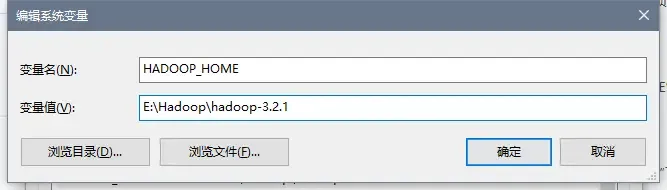
-
编辑Path变量
点击新建,添加%HADOOP_HOME%\bin;。
-
-
将bin目录下的hadooo.dll文件和winutils.exe拷贝到系统盘
C:\Windows\System32里面。如果bin目录没有,点击下载,提取码:0039。(hadoop.dll防止报nativeio异常、winutils.exe避免报空指针异常。)
    <properties>        <project.build.sourceEncoding>UTF-8</project.build.sourceEncoding>        <hadoop.version>3.2.1</hadoop.version>    </properties>
    <dependencies>
        <dependency>            <groupId>org.apache.hadoop</groupId>            <artifactId>hadoop-mapreduce-client-common</artifactId>            <version>${hadoop.version}</version>        </dependency>
        <dependency>            <groupId>org.apache.hadoop</groupId>            <artifactId>hadoop-mapreduce-client-jobclient</artifactId>            <version>${hadoop.version}</version>            <scope>provided</scope>        </dependency>
        <dependency>            <groupId>org.apache.hadoop</groupId>            <artifactId>hadoop-client</artifactId>            <version>${hadoop.version}</version>        </dependency>
        <dependency>            <groupId>org.apache.hadoop</groupId>            <artifactId>hadoop-yarn-common</artifactId>            <version>${hadoop.version}</version>        </dependency>
        <dependency>            <groupId>org.apache.hadoop</groupId>            <artifactId>hadoop-mapreduce-client-core</artifactId>            <version>${hadoop.version}</version>        </dependency>
        <dependency>            <groupId>org.apache.hadoop</groupId>            <artifactId>hadoop-hdfs</artifactId>            <version>${hadoop.version}</version>        </dependency>
        <dependency>            <groupId>jdk.tools</groupId>            <artifactId>jdk.tools</artifactId>            <version>1.8</version>            <scope>system</scope>            <systemPath>E:/Program Files/Java/jdk-8u261/lib/tools.jar</systemPath>        </dependency>
        <dependency>            <groupId>junit</groupId>            <artifactId>junit</artifactId>            <version>RELEASE</version>            <scope>compile</scope>        </dependency>
    </dependencies>
<build> <plugins> <plugin> <groupId>org.apache.maven.plugins</groupId> <artifactId>maven-compiler-plugin</artifactId> <configuration> <source>1.8</source> <target>1.8</target> </configuration> </plugin> </plugins> </build></project>新建log4j.properties文件放到resources下面,内容如下:
log4j.rootLogger=INFO, stdoutlog4j.appender.stdout=org.apache.log4j.ConsoleAppenderlog4j.appender.stdout.layout=org.apache.log4j.PatternLayoutlog4j.appender.stdout.layout.ConversionPattern=%d %p [%c] - %m%nlog4j.appender.logfile=org.apache.log4j.FileAppenderlog4j.appender.logfile.File=target/spring.loglog4j.appender.logfile.layout=org.apache.log4j.PatternLayoutlog4j.appender.logfile.layout.ConversionPattern=%d %p [%c] - %m%n获取文件系统
        // 第一种方式        // 获取Configuration对象        Configuration configuration = new Configuration();        // 设置Configuration对象,指定要操作的文件系统        configuration.set("fs.defaultFS","hdfs://hadoop101:8020");        // 获取指定的文件系统,相当于获取了主节点种所有的元数据信息        FileSystem fileSystem = FileSystem.get(configuration);
        // 第二种方式,可以传入第三个参数——访问的用户        FileSystem fileSystem = FileSystem.get(new URI("hdfs://hadoop101:8020"), new Configuration(),"root");
获取目录信息
// 获取指定目录下的所有文件信息,第二个参数为是否递归的查询 RemoteIterator<LocatedFileStatus> it = fileSystem.listFiles(new Path("/"), true); while(it.hasNext()){ // 获取每个文件详细信息 LocatedFileStatus fileStatus = it.next(); // 获取每个文件的存储路径 System.out.println(fileStatus.getPath() + "——" + fileStatus.getPath().getName()); // 获取文件的block存储信息 BlockLocation[] blockLocations = fileStatus.getBlockLocations(); // 获取每个文件的 System.out.println(blockLocations.length); for (BlockLocation blockLocation : blockLocations) { String[] hosts = blockLocation.getHosts(); for (String host : hosts) { // 每个存储了副本的主机 System.out.println(host + "——"); } }创建文件和文件夹
// 根目录下面递归的创建hello文件夹fileSystem.mkdirs(new Path("/app/test/hello"));
// 根目录下面创建a.txt文件fileSystem.create(new Path("/a.txt"));
下载文件
    方式一        // 获取HDFS文件的输入流        FSDataInputStream inputStream = fileSystem.open(new Path("/a.txt"));        // 获取本地文件的输出流        FileOutputStream outputStream = new FileOutputStream(new File("E://a.txt"));        // 实现文件的复制(org.apache.commons.io.IOUtils)        // 第一个参数输入流,第二个参数输出流        IOUtils.copy(inputStream, outputStream);        // 关闭流        IOUtils.closeQuietly(inputStream);        IOUtils.closeQuietly(outputStream);        fileSystem.close();
    方式二        // 第一个参数填HDFS路径,第二填本地路径        fileSystem.copyToLocalFile(new Path("/a.txt"),new Path("E://a.txt"));        fileSystem.close();
文件上传
// 第一个参数填本地路径,第二填HDFS路径 fileSystem.copyFromLocalFile(new Path("E://am.txt"),new Path("/"));文件合并
// 在HDFS创建一个文件 FSDataOutputStream outputStream = fileSystem.create(new Path("/bigFile.txt")); // 获取本地文件系统 LocalFileSystem local = FileSystem.getLocal(new Configuration()); // 获取本地文件夹下所有文件的信息 FileStatus[] fileStatuses = local.listStatus(new Path("file:///E:\\input")); // 遍历数据,获取每一个文件的信息 for (FileStatus fileStatus : fileStatuses) { FSDataInputStream inputStream = local.open(fileStatus.getPath()); IOUtils.copy(inputStream,outputStream); IOUtils.closeQuietly(inputStream); } IOUtils.closeQuietly(outputStream); local.close(); fileSystem.close();所有文件都有一份元数据信息,存储在内存中,所以合并小文件可以减轻namenode压力。